
Cold Stone®
KahalaFood & Drink
3.9979.00 Reviews
- Version
- 6.0.8
- Installs
- 500.00K
- Age Rating
- Everyone
Screenshots
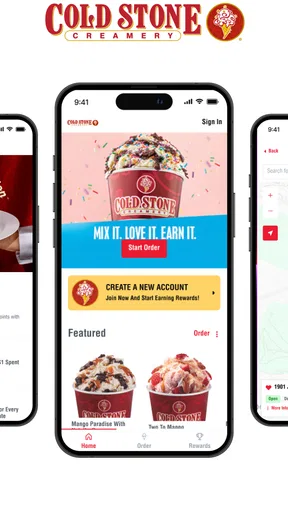
Our Review of Cold Stone®
 Analysis by Appyee
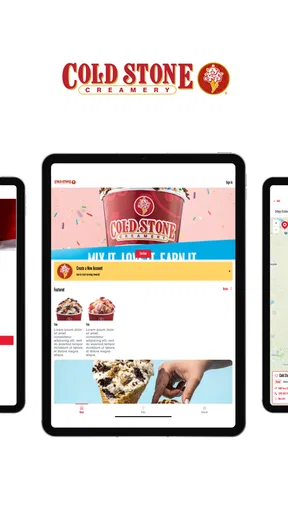
When I want ice cream without turning a simple treat into a long decision, I prefer an app that helps me move from craving to pickup with as little back-and-forth as possible. Cold Stone® is built for that particular moment. It brings ordering, store discovery, and rewards into one Food & Drink app from Kahala, so I can begin by deciding what I want, check where to get it, and see whether my account has any points or rewards waiting.
That sounds straightforward, and in daily use it mostly is. The app is free, aimed at Everyone, and its current version is 6.0.8. It has reached over 500 thousand installs, with a 3.9 average from around 4.7 thousand ratings. Those figures suggest a useful but not universally smooth experience: plenty of people find value in it, while the rating also hints that convenience depends on how well the ordering and location steps work for a particular visit.
From an ice-cream craving to a completed order
I find the useful starting point is to decide whether I want the app to save time at the counter or simply help me plan a treat. That distinction changes how I judge each step: a quick repeat order has different demands from a first visit with several choices to sort out. From there, I can look more closely at how the ordering flow handles a craving through to pickup.
Beginning with the situation that actually matters
The most useful way to understand Cold Stone® is not as a general restaurant app, but as a tool for a very specific workflow. I open it when I already have a destination in mind, need to find a nearby Cold Stone location, or want to check whether my rewards balance can make the visit more worthwhile. It is less helpful when I am comparing every dessert option in an area or looking for a broad restaurant marketplace.
That distinction matters because the app does not need to replace every food service tool on my phone. Its job is narrower: help me choose from Cold Stone’s menu, pass the order to a participating location, and keep the loyalty part of the visit connected to my account. If that is the task in front of me, the focused design makes sense.
My first practical tip is to open the app before I am standing at the counter with a group waiting behind me. Browsing calmly gives me time to consider the base ice cream, mix-ins, size, and any other available choices without making the ordering line carry the full burden of my indecision. The app is most valuable as a planning tool, not merely as a digital version of a last-second counter order.
Finding the right location before building the order
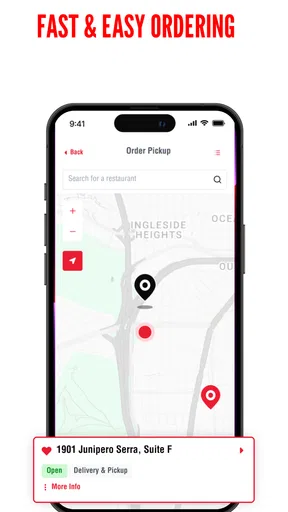
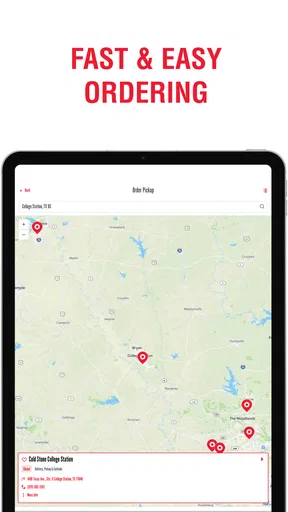
The location step should come early. I would first use the store finder to identify the branch that is actually convenient for the trip, rather than selecting items and assuming every nearby shop will handle the order in the same way. This is especially important when I am arranging a pickup around work, school, a cinema visit, or a drive across town.
A store finder is more than a map shortcut in this context. It establishes the handoff point for everything that follows. The selected location affects where the order is prepared, where I need to go, and whether the timing makes sense. If I am ordering for someone else, confirming the branch first also prevents a surprisingly common mistake: sending a treat to the location closest to me instead of the one closest to the person collecting it.
I also recommend checking the chosen store again before finalizing. A location can look close on a map but be awkward to reach because of traffic, a shopping-center entrance, or a route that is inconvenient at the time I plan to arrive. Cold Stone® helps narrow the search, but I still need to apply ordinary judgment about the actual journey.
Building an order without losing the personal touch
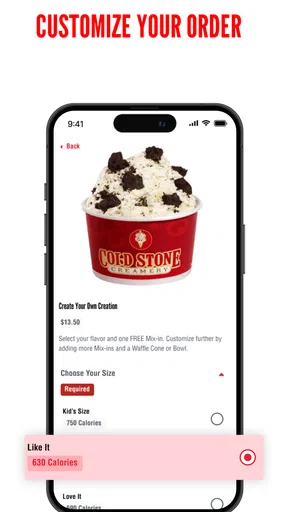
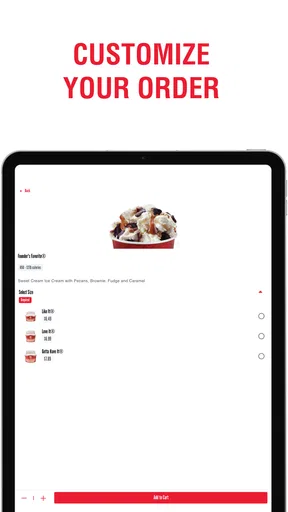
Cold Stone’s appeal has always been the ability to make an ice-cream order feel personal, and the app works best when I use it to prepare that customization rather than treating it like a generic checkout form. I can think through the combination I want, review the choices on screen, and reduce the chance of forgetting a mix-in or selecting the wrong size while speaking quickly at the counter.
There is a useful trade-off here. Digital ordering gives me a clearer record of what I selected, but it can also make the process feel more deliberate than ordering a familiar item face to face. If I already know my usual combination, the app can be faster. If I enjoy asking questions about a flavor or changing the order based on what looks appealing in the shop, a direct conversation may still be better.
For a family order, I would build each person’s item separately and pause to check the full basket before sending it. This is one of the less obvious advantages of using the app: it creates a moment to catch small errors before the store receives the request. A child’s preferred mix-in, a different size, or an item that should not contain a particular ingredient is easier to inspect on a screen than to remember from a hurried verbal exchange.
That said, I would not treat the app as a substitute for asking the store about allergy concerns. A menu interface can help me communicate a selection, but food sensitivities require careful confirmation with the location. When the order has serious dietary consequences, the safer workflow is to use the app for convenience only after I have obtained the information I need directly from the store.
Checking rewards at the moment they are useful
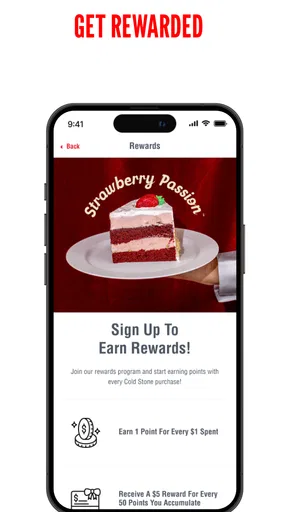
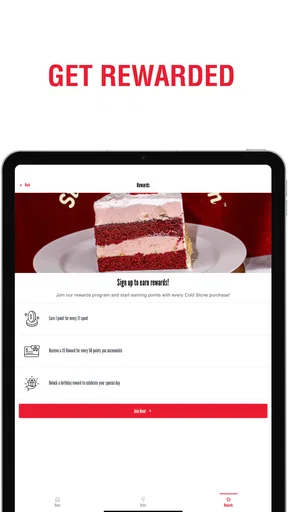
The rewards balance is most useful when I check it before I begin the order, not after I have already paid. Seeing the available points or rewards early helps me decide whether to use one now, save it for another visit, or place an order that fits the occasion. This is a small habit, but it prevents the common disappointment of discovering a benefit only after the transaction is complete.
I also like the way a loyalty balance can change the decision for a group visit. If I am buying several treats, the account information becomes part of the planning rather than an afterthought. I can decide whether the current visit is the right time to redeem something or whether keeping the balance for a future personal stop makes more sense.
There is a handoff involved here as well. The app shows the account side of the experience, while the store fulfills the order and the loyalty activity needs to remain associated with the correct account. I would make sure I am signed into the intended profile before placing an order, particularly on a shared device. That simple check is more valuable than it sounds because rewards are useful only when the account trail is clean.
Moving from the phone to the store
Once the order is ready to submit, the app’s role changes. It stops being a browsing space and becomes a communication channel between me and the selected Cold Stone location. I review the store, the items, the customizations, and the rewards decision one last time before confirming. This final pause is where I catch most avoidable mistakes.
The handoff is not completely invisible. I still need to travel to the selected shop, identify the order when I arrive, and make sure the result matches what I requested. That is not a flaw unique to this app; it is simply the reality of connecting a digital order to a physical dessert counter. The app can organize the request, but it cannot remove the need for a human pickup step.
For an everyday scenario, imagine leaving the office on a warm afternoon with two colleagues. I would find the nearest practical store first, build each person’s order while we are still deciding, check the rewards balance, and submit the order before driving. One person could collect everything while the others head to the car. In that situation, the app reduces repeated explanations and gives the group a shared record of the choices.
For a different scenario, such as surprising someone at a location across town, I would be more cautious. I would verify the destination carefully, confirm who will collect the order, and avoid assuming that a digital submission alone guarantees a perfectly timed surprise. The workflow is helpful, but the physical handoff still needs coordination.
What the completed result feels like
The successful outcome is not just an order confirmation. It is a smoother visit: I have chosen a location, made the order legible, checked my rewards, and arrived with fewer decisions left to make. That is where Cold Stone® earns its place on my phone. It compresses several small tasks into one focused path without asking me to search through unrelated restaurants or loyalty programs.
I find the app particularly useful for repeat visits. Once I understand how I like to use it, the process becomes a routine: location, order, account check, review, handoff. Repeat customers benefit more than first-time visitors because they already know the kind of dessert they want and can use the app to remove friction rather than to learn the entire brand from scratch.
The result is also useful when I am ordering for more than one person. A written digital selection is easier to verify than a string of spoken requests, and that reduces the chance of mixing up customized items. I would still inspect the order at pickup, but the app gives me a better starting point for that check.
Where the workflow becomes less reliable
The main limitation is that the app’s convenience depends on the selected location and the transition from screen to store. If the nearby shop is not the right branch for my route, the digital work does not save much time. If I need detailed advice before choosing an item, the app may also feel too narrow compared with speaking directly to staff.
Another point of friction is the difference between a clean digital order and the messy reality of a busy shop. A customized ice-cream request may be easy to enter, but the final experience still depends on preparation and pickup. I would not schedule an extremely tight connection around the assumption that the app removes every delay. For ordinary errands it is convenient; for a deadline, I would leave room for the physical part of the process.
The rating of 3.9 reflects my own impression that the app is useful without being flawless. I would not install it expecting a broad restaurant platform, advanced meal planning, or a replacement for every question a store employee can answer. Its strengths are concentrated in ordering Cold Stone treats, locating a shop, and checking rewards. Outside those tasks, the value drops quickly.
There is also a practical reason some people may prefer the usual alternatives. If I am already inside the store, ordering at the counter is often simpler than taking out my phone, finding the location, and rebuilding a familiar order. Likewise, if I am comparing Cold Stone with several dessert shops, a general map or food-ordering service may be better for discovery. Cold Stone® is strongest when I have already chosen the brand and want a direct route to the visit.
For users on older devices, the minimum operating system is Android 7.0, which keeps the app accessible to many phones while still making compatibility worth checking before installation. The developer is Kahala, and the app’s free price removes the financial risk of trying it. I would still judge it by the time it saves in my own routine rather than by installing it simply because it costs nothing.
Who should use it and who should skip it
I would recommend Cold Stone® to regular customers, families placing several customized orders, and anyone who likes checking rewards before visiting. It is also a good fit for people who prefer to make decisions privately on a screen instead of holding up a line while working through combinations. The location feature adds value when I am visiting an unfamiliar area or choosing between branches.
I would skip it if I rarely visit Cold Stone, always order at the counter, or mainly want to compare every dessert option around me. Someone with complex dietary questions should also begin with direct store communication rather than assuming the app can answer everything through its ordering flow. And if the nearest location is inconvenient, the app cannot solve the underlying travel problem.
My best advice is to use it as a preparation and coordination tool. Open it before leaving, select the practical store, check the account balance, build the order carefully, and leave enough time for pickup. That workflow makes the app feel purposeful instead of unnecessary.
After using it in that way, I see Cold Stone® as a focused companion for a specific kind of treat run. It does not need to be a complete food platform to be useful. When I already want Cold Stone and care about a smoother handoff, it saves decisions and keeps the order organized. When I want broad discovery, personal advice, or a spontaneous counter experience, the traditional alternatives remain better.
My final recommendation: install it if Cold Stone is part of your regular dessert routine, especially when rewards and customized group orders matter. The free app is easy to try, and its best workflow is clear from the first store search to the final pickup. Just remember that the phone handles the organization; the store still handles the real-world result.
Verdict
Strengths of Cold Stone®
- Browse Cold Stone’s menu and signature creations before visiting.
- Store locator helps find nearby shops quickly.
- Customizable ice cream combinations suit different tastes.
- Seasonal flavors and promotions add variety to repeat visits.
- The app can make ordering your preferred treat more convenient.
Limitations of Cold Stone®
- Availability of flavors and toppings may vary by location.
- Some menu items can be expensive compared with standard ice cream.
- Customization options may increase the final order price.
- The app’s usefulness depends on participating Cold Stone locations.
- Large, image-heavy menus may feel slow on older devices.
Similar Picks in This Category
View All
Rappi: Food Delivery, Grocery
Rappi, Inc - Delivery3.5

McDonald’s: Cupons e Delivery
Arcos Dorados4.3

Swiggy: Food Instamart Dineout
Swiggy4.7

Blinkit: Groceries & more
Blinkit4.8

foodpanda: food & groceries
Foodpanda GmbH a subsidiary of Delivery Hero SE4.0

Zomato: Food Delivery & Dining
Zomato4.7
Frequently Asked Questions
What is the Cold Stone® app used for?
The Cold Stone® app is designed to make ordering and visiting Cold Stone Creamery more convenient. Depending on your location, it may let you browse ice cream flavors and menu items, customize creations, find nearby stores, view promotions, place orders for pickup or delivery, and manage rewards. Available features can vary by country, store, device, and current app version.
Can I earn and redeem rewards through the Cold Stone® app?
In supported locations, the app includes access to Cold Stone’s rewards or loyalty program. You may be able to earn points or receive promotional benefits when making eligible purchases through the app or at participating stores. Rewards normally have specific terms, expiration dates, and exclusions, so review the conditions carefully before ordering. Program availability and benefits may differ by region.
Can I customize an ice cream creation before ordering?
Yes, the Cold Stone® app generally allows customers to explore menu items and, where mobile ordering is supported, customize creations with different ice cream flavors, mix-ins, toppings, sizes, and other available options. The choices shown depend on the selected store’s inventory and menu. Some custom requests may only be available in person and cannot always be added online.
Does the Cold Stone® app support delivery and pickup orders?
The app may offer pickup, delivery, or both, depending on the participating Cold Stone location and your area. After entering your address or selecting a store, available ordering methods should be displayed. Delivery fees, minimum order requirements, estimated times, and service availability can vary, particularly during busy periods, holidays, or severe weather. Confirm all details before payment.
Is the Cold Stone® app free to download and use?
The Cold Stone® app is generally free to download from the official Android or iOS app store, although you will need an internet connection and may need to create an account for ordering or rewards features. The app itself does not usually require a subscription, but purchases, delivery charges, taxes, and optional service fees still apply to orders placed through it.
